
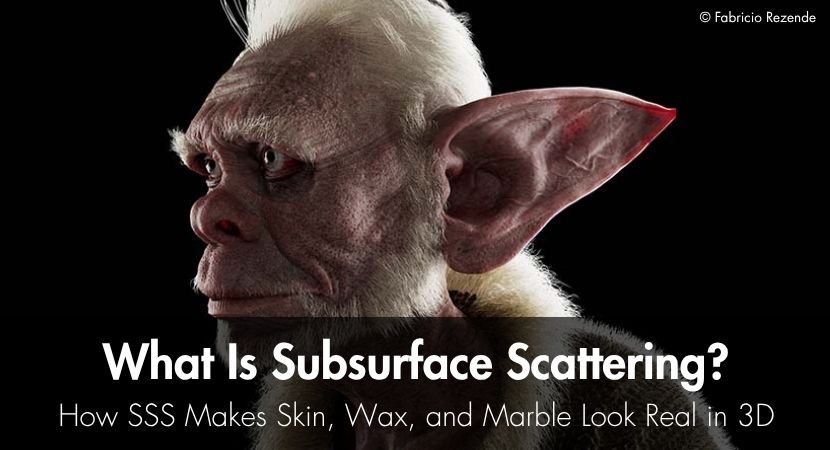
Have you ever pressed a flashlight against your fingers and noticed how light goes through them and makes them glow a warm red color? This effect is called subsurface scattering (SSS): light enters a material, scatters beneath its surface, and exits elsewhere.
The same behavior can also be observed in semi-translucent materials like wax, marble, jade, and even food. This effect is quite important in 3D rendering as it makes objects look realistic. Without it, objects may appear unnaturally flat, opaque, and plastic-like.
What Is Subsurface Scattering?
SSS is observed in semi-translucent materials. When you say translucent, these are objects that allow light to pass through. SSS happens when light penetrates the surface of a semi-translucent material, scatters, gets partially absorbed, and then emerges from a different point. This process gives the object internal color and a sense of depth. This effect can be seen in everyday objects like a candle, fruit, or the leaves of a plant.
How Does Subsurface Scattering Work?
The effect subsurface scattering produces varies depending on factors like material density, thickness, color, and how far light can travel beneath the surface. While different scenarios produce varying effects, the process remains the same: light penetration, light scattering under the material’s surface, light exiting at different point(s).
Scattering Distance and Color
Scattering distance is measured from the point at which the light enters the object to the point at which it comes back out. Basically, it’s the scale of internal light travel. A short scattering distance produces a denser look, while a longer scattering distance produces a more translucent appearance.
It is important to note that some renderers use an RGB radius to control scattering distance, while others use a single scattering radius combined with a scattering color. The difference is that an RGB radius allows each color channel to have its own scattering distance. For example, with skin, light passing through produces a warm appearance. This is because red wavelengths travel better through tissue.
Forward, Backward, and Isotropic Scattering
Different materials will have their own unique internal structure and composition. Because of this, SSS can produce different types of scattering, or how light bounces around an object. Forward scattering is when light mostly keeps moving in a direction similar to its incoming path. Backward scattering is when light is mostly redirected back toward the side it entered from. Isotropic scattering is when light scatters evenly in all directions. These different types of scattering will produce varying surface illumination.
Subsurface Scattering vs. Transmission and Translucency
Subsurface Scattering, Transmission, and Translucency are all different light behaviors. However, they’re mostly confused with one another, and for good reason.
They have similar properties, but here’s what sets them apart:
| Effect | How Light Behaves | Typical Materials | Best Used For |
|---|---|---|---|
| Subsurface Scattering | Enters, scatters beneath the surface, and exits elsewhere. | Skin, wax, marble | Soft tissue and dense translucent materials |
| Transmission and Refraction | Passes through and changes direction at material boundaries. | Glass, water, crystals | Clear and transparent materials |
| Translucency | Passes through while becoming softly diffused. | Leaves, curtains, thin paper | Thin, semi-transparent materials |
Which Materials Need Subsurface Scattering?
Not all materials will need subsurface scattering to look realistic. The basic rule is, if an object is neither completely opaque nor clearly transparent, then it could benefit from SSS.
Skin
Skin benefits the most from SSS, and subsurface scattering skin materials are a core part of character rendering. Without SSS, skin will look flat, plastic, or painted. And it will be the first thing that people will notice, as we are very good at noticing when skin looks unnatural. The effects of SSS on skin are more obvious on thin areas like the ears, nostrils, and fingers.
Wax and Other Soft Translucent Materials
Unlike skin, candles and wax are more solid materials, but they’re still considered soft translucent objects. Their structure, while firmer than skin, still allows some light to penetrate beneath the surface. This is why candles, when lit, appear to be burning from the inside as well, because the light of the fire penetrates their surface and gives it a soft internal glow. This effect can be seen in similar objects like soap, some plastics, and translucent cosmetic products.
Marble, Jade, and Stone
Certain stones, as hard as they are, are not completely opaque. This allows some light to penetrate the surface, scatter through the material, and eventually emerge again, creating the effect of subsurface scattering. This gives certain types of stone a sense of depth and character that diffuse color and reflections cannot produce alone. Two examples of this are marble and jade.
Food, Plants, and Organic Materials
SSS also helps make organic materials such as fruit, milk, juice, leaves, and wood fibers look more natural. As light enters these materials, it scatters beneath the surface and creates the soft, slightly glowing appearance seen in many natural objects.
How to Set Up Subsurface Scattering in 3D
While the exact settings vary between software and renderers, the basic SSS setup workflow remains the same:
Choose a Shader That Supports SSS
Use a shader that supports subsurface or volumetric scattering. This is because SSS is not just a color effect. A compatible SSS shader’s job is to calculate how light enters the material, travels beneath the surface, scatters, and exits again.
For a broader approach to organizing and building reusable materials, see the guide to building a universal PBR material library.
Set the Correct Scene Scale
Object scale affects how far light can scatter inside a material. Since SSS uses the model's physical size, the same scattering radius can look very different on a small wax object, a piece of skin, or a large marble model.
Adjust Scattering Radius, Color, and Amount
The scattering radius or distance controls how far light travels beneath the surface, while the subsurface color and SSS amount control the color and strength of the scattered light.
Surface color and roughness then control the material’s base appearance and how sharply or softly it reflects light.
Test SSS Under the Right Lighting
SSS can be difficult to observe under flat lighting or even frontal lighting. If you want to see SSS at full effect, you should try different lighting setups. It’s recommended that you test SSS with side or backlighting, as this reveals thin areas and makes internal scattering more obvious.
How Does Subsurface Scattering Work in Blender?
In Blender 5.2 LTS, subsurface scattering is handled through the Principled BSDF shader and its subsurface-related controls. Earlier Blender versions used different naming and layout, so older tutorials may not match what users see in the current interface.
- Method - changes how Blender calculates the subsurface effect.
- Weight - controls how strongly the material blends from diffuse surface shading into subsurface scattering.
- Radius - controls the average distance that light scatters below the surface.
- Scale - applies a global multiplier to the radius.
- IOR - affects how rays enter the subsurface component.
- Anisotropy - controls whether light scatters more evenly, more forward, or more backward inside the material.
Why Does My Subsurface Scattering Look Wrong?
The appearance of subsurface scattering is mainly controlled by three main factors, namely: settings, lighting, and geometry.
Common issues affecting subsurface scattering appearance:
- Material looks plastic: the shader you are using is not compatible with subsurface scattering, or SSS settings are set too low.
- Skin looks like wax: the scattering distance or SSS amount is too high, so the scattered light spreads too far.
- Material looks too transparent: the scattering distance is too high, or SSS is being mixed up with transmission, so light passes through too easily.
- The effect is invisible: the scale is too small, the lighting does not reveal the effect, or the scattering radius is too small/large for the object.
- Artifacts appear around the geometry: check thickness, overlapping faces, flipped normals, or open geometry.
- Render becomes significantly slower: SSS naturally increases render time; this is why it’s important to use SSS only where its contribution is visible. Remember to optimize other material settings where possible. For more detailed performance advice, see the RebusFarm material optimization guide.
Tips for More Realistic SSS Rendering
Use these practical tips to make SSS look more natural and consistent across different materials:
- Take inspiration from real-world instances of SSS
- Set the object or scene scale before configuring the shader settings
- Start with subtle scattering and increase it gradually
- Try different lighting directions to see which one complements SSS the best
- Evaluate SSS with roughness, reflections, and surface textures rather than in isolation
- Pay attention to thin areas, where SSS is usually more visible.
- Use full SSS selectively where it meaningfully improves the final image.
FAQ
Can Subsurface Scattering Be Used in Real-Time Games?
Yes, SSS can be used in real-time games, but with performance and game responsiveness in mind. Often, approximations are used instead of high levels of accuracy and realism.
Can You Bake Subsurface Scattering Into a Texture?
Yes, SSS can be baked into a texture, but it won’t have the same dynamic properties. It will be a static visual that will not respond to lighting, camera, and material changes.
Does HDRI Lighting Work With Subsurface Scattering?
Yes, HDRI lighting works with SSS and is used to provide soft and natural illumination to complement subtle scattering.
Can Stylized Materials Use Subsurface Scattering?
Yes, SSS can be used in stylized characters and objects for artistic effects.
Does SSS Work Together With Normal and Displacement Maps?
Yes. Normal maps change how the surface is shaded without changing its shape, while displacement maps change the actual geometry. Since SSS depends on the thickness and shape of an object, displacement can change where light enters, scatters, and exits, while normal maps mainly affect fine surface shading.

About the author
Nicole Holt is an experienced 3D enthusiast with a career in marketing and content writing. Thanks to this unique combination, she is able to showcase the technical intricacies of 3D art and rendering while also making the subject accessible to a wide audience. When she's not immersed in the digital world, Nicole can be found in the great outdoors, most likely with her beloved dog, Sammy.