
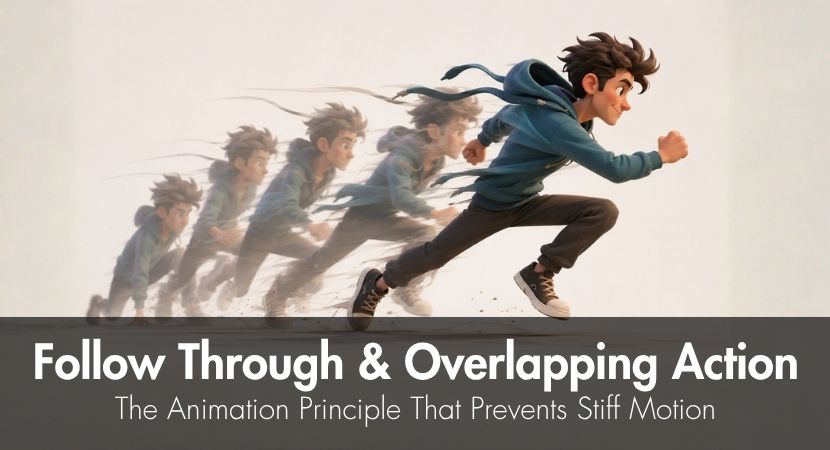
Follow through and overlapping action are two core principles from the 12 basic principles of animation, and they exist to prevent motion from looking stiff or mechanical. Introduced by Disney animators, both describe how parts of a body or object keep moving after and around the main action, instead of starting and stopping all at once.
Stiff motion occurs when an object moves from one position to another at a constant speed and stops suddenly. In reality, body parts and objects slow down, overlap, and settle naturally rather than stopping instantly.
This guide covers how follow-through and overlapping action make animation more natural and the physics behind it. We’ll also talk about body hierarchy, material timing, and how all these concepts can be observed in popular films.
We’ll also be giving practical exercises for you, so you can master follow-through and overlapping action in your own work.
What Is Follow Through and Overlapping Action in Animation?
Follow through and overlapping action animation are two of the 12 animation principles introduced by Disney animators in the book “Disney Animation: The Illusion of Life.”
The complete set of principles includes:
- squash and stretch
- anticipation
- staging
- straight ahead action and pose to pose
- slow in and slow out
- arcs
- secondary action
- timing
- exaggeration
- solid drawing
- appeal and
- follow through and overlapping action
These principles make animation feel more natural and believable by following how objects and living things move in the real world.
What Is Follow Through in Animation?
Follow through refers to the continued movement of a character's or object's parts after the main action has stopped. This happens naturally because of momentum and inertia.
Just imagine yourself when you walk, then you come to a complete stop. What happens to other parts of your body, like your hair, your arms, your clothes, or the handbag you’re carrying? Do they come to a complete stop as soon as you do?
When you stop walking, physics causes your hair, clothes, and anything you're carrying to keep moving forward for a moment due to momentum. Follow through captures this residual motion.
What Is Overlapping Action and Drag?
On the other hand, overlapping action is how different parts of a character or object contribute to a larger action, but with a subtle delay relative to each other. If follow through happens after the primary action, overlapping action happens in conjunction with the main action.
For example, when a character turns their head, the motion does not happen all at once. The movement may begin at the hips, followed by the torso and shoulders, then the neck, and finally the head. There’s an overlap with every movement, and this overlap makes the action more fluid and natural.
An additional element to overlapping action is drag.
Drag is how parts of the character or object trail behind the main action because of weight, flexibility, or inertia. As a character turns their head, imagine how their hair does not instantly follow the motion. Instead, it lags behind for a few frames before catching up.
Key Takeaway: Follow through happens after the main motion, overlapping action is the delayed timing between parts moving together during the main action, and drag is when secondary parts trail behind the main action.
The Physics Behind Follow Through and Overlapping Action
Follow through & overlapping action are physics-based concepts, particularly based on the principle of inertia.
In simple terms, the law of inertia means that objects like to keep doing what they’re already doing. If an object is in motion, it will remain in motion unless something stops it from moving. And, anything at rest will remain at rest unless something forces it to move.
This is why, in animation that follows Disney’s 12 principles, characters or objects do not just move or stop abruptly.
Different body parts also carry their own momentum, causing them to react at different times. When a character suddenly changes direction or comes to a stop, parts like the hair, clothing, or limbs may continue moving before catching up or settling. This natural delay is what creates follow through, overlapping action, and drag, making the motion feel more believable.
Key Takeaway: If it has mass and is attached to something, it will drag behind and settle after - the physics animators must capture.
Body Hierarchy and Motion Order in Overlapping Action Animation
While applying overlapping action in character animation requires a good understanding of body mechanics and physics, the logic is easier to understand through motion hierarchy. There’s a usual order, or a body hierarchy, that most animators follow.
The main concept to remember is that not all body parts move simultaneously. Most of the time, the movement comes from the center of the body outward. Here’s the usual order:
- Core: including the abdomen, back, hips, and glutes, is usually where movement starts because it is the body’s largest mass, and it determines both direction and balance.
- Limbs: including the arms and legs should follow the core with a slight delay.
- Extremities: including the hands, feet, and head, come next, reacting after the main limbs.
- Appendages: such as hair, tail, clothing. These parts move last with the most drag.
Frame Delays as Starting Points for Overlapping Action
Frame delays refer to the timing difference between when one body part moves and when the next part begins to follow. This prevents everything from moving at the same time, creating a more realistic and smoother motion.
These are just approximate guides. Adjust according to action speed and character design:
- Torso to shoulders: 1-2 frames delay
- Shoulders to elbows: 2-3 frames delay
- Elbows to hands/fingers: 2-3 frames delay
- Head to hair tips: 2-4 frames delay (varies by hair length)
Important note: At 24 frames per second, 2-3 frames is roughly 1/10th of a second. These delays should be subtle, but with the right combination can make a whole scene look natural.
Key takeaway: Motion flows outward from the core, then limbs, extremities, and lastly, loose parts like hair and cloth.
How Material Properties Affect Follow Through Animation
How body parts and objects follow through a motion will depend on several factors, including weight, flexibility, material, attachment strength, and the overall speed and force of the movement.
Here are general principles that describe how material behavior affects motion:
- Heavier objects carry more momentum, so they tend to move farther and for longer in some conditions.
- Flexible materials or objects can have a rubber band effect, causing them to deform when in motion with increased follow-through.
- For hair, it can take around 4-8 frames of movement after the head stops.
For example, Rapunzel’s hair in Tangled (2010), every time she moves or drops from her tower - Cloth or fabric follows through depending on medium weight and cut (affecting how wind interacts with the cloth). Capes, for example, move 3-6 frames after character movement.
- Heavier garments, such as coats or layered outfits, typically continue moving for 2–4 frames before settling. This can be seen in Elsa’s cape in Frozen (2013) or the Incredibles’ (2004) suits.
- Soft tissue shows subtle jiggle and usually takes 1–3 frames to fully settle, as seen in characters like Baymax in Big Hero 6 (2014).
- Rigid objects have the least amount of follow through. Take, for example, Woody’s pull-string. Once pulled, it snaps back in position and shows a quick, subtle recoil.
- Liquids show the maximum follow-through and overlap, with motion continuing long after the container stops, as seen in splashes, waves, and sloshing water that keep shifting before gradually settling.
Follow Through Techniques in 2D vs. 3D Animation
2D Animation Approach to Overlapping Action
In 2D animation, overlapping action is created manually by offsetting drawings frame by frame. The animator decides when each part of the character starts moving, how far it trails behind the main action, and how it settles after the movement stops.
This process relies on careful observation, timing charts, arcs, and clean spacing. Onion skinning is especially useful here because it lets animators compare previous, current, and upcoming frames while adjusting the motion of hair, clothing, limbs, or props.
The 2D approach is time-consuming because every delay and settle has to be drawn intentionally. However, it gives animators strong artistic control over the exact shape, rhythm, and exaggeration of the movement.
3D Animation Approach to Follow Through
3D animation involves creating computer-generated graphics using 3D modeling software like Blender, Maya, and Cinema4D, to name a few.
Animators apply the follow through principle by rigging characters and creating secondary controls for elements such as hair, clothing, and other appendages with built-in delays. Modern 3D software also allows animators to simulate physics accurately, enabling these materials to move naturally and realistically with the character to which they are attached.
This approach combines procedural and automated techniques with manual animation adjustments. Simulations provide a realistic base motion, while animators refine and enhance the results to achieve the desired artistic effect.
Note: More complex simulations significantly increase render times. To reduce rendering time, a solution is to offload rendering work to a render farm.
Key Takeaway: 2D animation requires manual, frame-by-frame work but gives animators more artistic control. 3D animating uses automation and accurate physics simulation, but without artistic override, it may look mechanical and lifeless.
Follow Through and Overlapping Action Examples in Films and Games
Disney and Pixar Examples of Follow Through Animation
Film animation is one of the easiest places to study follow through because every frame is designed for readability. In Tangled (2010), Rapunzel’s long hair rarely moves as one solid mass. It drags, bends, catches up, and settles in sections, which helps sell its weight and length without making it feel rigid.
Frozen (2013) also shows strong examples in Elsa’s cape and dress, especially during broad movements where the cloth follows her body with a slight delay. The movement is not just decorative; it supports the direction, rhythm, and elegance of the performance.
In Toy Story (1995), Woody’s floppy arms, pull-string, and loose toy-like body parts help communicate that he is made from soft and rigid materials at the same time. Monsters, Inc. (2001) is another useful example because Sulley’s fur reacts subtly to movement, adding texture and weight without distracting from the character acting.
Video Game Examples of Overlapping Action
In games, overlapping action has to be balanced with responsiveness. A film shot can allow longer follow-through, but a playable character must still feel immediate and controllable.
Action games often use capes, weapons, straps, or hair to add weight to movement. In combat animation, a sword or cape may continue moving for a few frames after the character stops, making the attack feel heavier without delaying player input. In 2D games, cloak and scarf animation can serve the same purpose, helping jumps, landings, and turns feel less stiff.
The key difference is restraint. Game animation usually needs shorter, cleaner follow-through than film animation because the motion must loop, blend between states, and respond to player actions in real time.
Key Takeaway: Film animation can use longer, more detailed follow through, while games usually need tighter overlapping action that adds weight without hurting responsiveness.
How Follow Through Works with Other Animation Principles
Follow through and overlapping action do not only help make your animation projects more realistic, but they also work hand in hand with other animation principles.
Anticipation - this is a common principle in animation that aims to prepare the audience for an impending action. For example, when a character intends to jump, he/she crouches down first. This tells the audience what happens next - the character launches upward. Follow through completes the motion arc.
Squash and Stretch - this shows the audience that a character or object has its own weight, flexibility and density by how it compresses (squash) and stretches when it interacts with its surrounding environment. Follow through allows its secondary parts to continue moving even after the primary movement, to create a more realistic motion.
Arcs - follow through motion should follow curved paths, neither straight lines nor angles, because arcs have the most natural movement path due to principles of momentum, gravity, and flexibility.
Common Follow Through Mistakes and How to Avoid Them
- Ending movements abruptly: this can be prevented by offsetting stopping points by 2-4 frames per body part.
- Using uniform delay: delay between frames can make movements more realistic, but if these delays are uniform, it makes characters look robotic. Vary delays based on mass and attachment.
- Ignoring material differences: hair, cloth, skin, metal, and rubber should not all follow through in the same way. Adjust the amount of drag, overlap, and settling based on the material’s weight and flexibility.
- Motion paths look mechanical: introduce arcs to movements and proper follow through so that movements settle/stop naturally.
Training Your Eye for Follow Through and Overlapping Motion
Here are exercises you can do to practice applying the principles of follow through and overlapping motion to your animations.
- Pendulum exercise: animate a ball on a string swinging. Ensure proper drag and avoid abrupt ending of motion.
- Ball with tail: animate a bouncing ball with a ribbon attached to it, trailing it as it bounces. Focus on how the tail follows the ball’s motion.
- Flour sack: this is a classic exercise where a flour sack comes to life. Animate the flour sack as if it’s a human body, jumping, kicking a ball, dancing, etc. Focus on body squash and overlap on landing.
- Hair turn: animate a character with long hair turning its head. Practice drag and settle timing.
- Reference filming: film yourself performing random actions. Study the video frame-by-frame. Notice how your clothes, hair, and accessories move with your body.
- Observation habit: see how the real world moves. Pay attention to how hair, fabric, accessories, and loose objects react to motion, gravity, and sudden stops.
For additional study, animators can also explore Pixar in a Box, an educational resource created by Pixar in collaboration with Khan Academy.
FAQ
What is the difference between follow through and overlapping action?
Follow through is the continued movement of parts after the main body stops, while overlapping action is when different parts move at different rates or times during the main action.
How many frames should follow through last?
There is no fixed number because follow-through depends on speed, weight, flexibility, and style. As a starting point, soft tissue may settle within 1-3 frames, heavier garments may take 2-4 frames, and hair or capes may continue moving for 3-8 frames. These are guidelines, not strict rules, so always test the timing in motion.
Can I use physics simulation for follow-through in 3D?
Yes, but you should not rely on it alone. The most convincing animations combine physics simulations with manual adjustments to achieve the desired timing, style, and performance.
How does follow through differ in games vs. film animation?
Film animation prioritizes realism and often uses detailed follow through. In games, developers focus on player experience and responsiveness, so follow through is quicker or much more simply integrated.
What exercises help learn overlapping action?
Popular exercises that help beginner animators learn overlapping action include the pendulum exercise, hair turn, ball with tail, and observing real-world motion.

About the author
Nicole Holt is an experienced 3D enthusiast with a career in marketing and content writing. Thanks to this unique combination, she is able to showcase the technical intricacies of 3D art and rendering while also making the subject accessible to a wide audience. When she's not immersed in the digital world, Nicole can be found in the great outdoors, most likely with her beloved dog, Sammy.