
Cinebench: Measure your CPU performance for 3D Rendering
2012年06月14日(木) by Nicole Holt
In the ever-evolving landscape of digital content creation, the performance of your CPU plays a crucial role. In a world dominated by visual effects and 3D animations, it's essential to consider the tools and benchmarks that can help you assess and optimize your computer's processing power.
Rendered at RebusFarm: RUIN Short Film
Monday, March 19th, 2012 by Ralph Huchtemann
RUIN has been 100% rendered at RebusFarm in 2012 by Los Angeles-based Oddball Animation studio, with most of the modeling and animation done by Wes Ball.
Rendering and Modelling: modo
Animation: Lightwave
http://www.conceptruin.com
FUNK BLASTER is a music video of KOAN Sound, a British dubstep group, directed by Los Angeles-based artist and filmmaker Scott Pagano.
Software: Maya and V-Ray
REBUS Renderfarm Blog
2009年9月30日月曜日 Ralph Huchtemannにより発表された
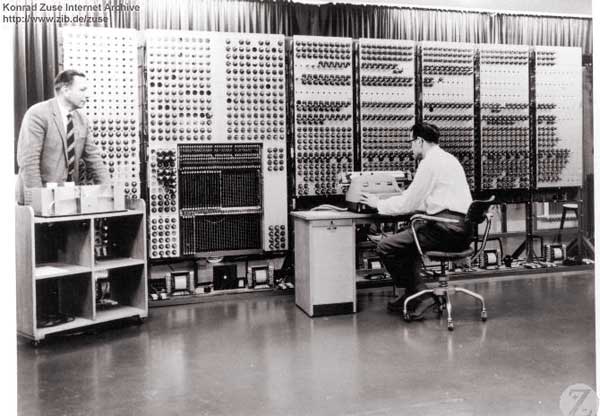 Supercomputer G3 (1960) by Konrad Zuse
ドイツにあるREBUSファームは、新たな概念の投入及び膨大な開発時間を費やして、プラグインを通じて、かの会社が持つ18000GHzのレンダーファームと3Dソフトをリングさせた。
商業的なレンダーファームが顧客に提供するサービスには、主に三つのメリットがあります:
- 締め切るが迫る時、それは救いの手になる
- ユーザーはハートウェアを購入しなくても、山場を乗り切れる。すべての費用はレンダーファームに含まれた。
- 低コストでレンダリングサービスを使用し続けるができる。
これらのメリットは、レンダーファームが早い作業速度及びユーザーの需要に応えれることを意味する。予定より遅れる顧客は、一日も早く成果がほしいし、普通の顧客も使いにくいレンダーファームを受け入れられない。
初期のレンダーファーム概念
今まで、さまざまのレンダーファームシステムは、手動、半手動などの形式を取っていた。手動形式はすぐに結果が得られない、最悪の場合は翌日になってやっと返事がくる。例え理想的な環境においても、リングの構成と内容の調整はとても時間をかかる。半手動形式はネット上にあるインターフェイスを提供し、すぐレンダー作業に取りかかると約束する。しかし、現実はそう甘くない。どのシステムも3Dソフトのバージョン及びレンダーエンジンを識別できない。もし違うバージョンのソフトで同じドキュメントを処理する場合、これはとても大事な機能、それでも予想外の結果になることを避けられない。ロストした内容があるにもかかわらず、レンダー作業がそのまま続行することがよくある。
Farminizerの概念
 The REBUSfarm software concept現存するいずれのシステムも、REBUSファームを運営側を納得されることができなかった。そこで、開発者自身の需要と専門知識に基づいて、ある新しい全自動システムが生みだられた。それは:顧客は自分の3Dソフトの中で、すべてを完結しなければならない。Farminizerはまずレンダーファームに作業を管理するサーバーに、レンダー作業を提出する。そしてユーザーとレンダーファームを連結するために、ユーザー側のソフトバージョンとレンダリングエンジンに関する情報を収集し、調整を入れる。こうすることによって、間違えた作業があって、レンダーファーム側は整合性を保つことができる。その環境では、提出された作業は必ずレンダーファームで正しくレンダリングされる。間違えた作業が現れることは、想像できないことになる。他にも作業を提出する前に、粗方にエラーを探知し、ユーザーの不要な支出をできる限り減らす。FarminizerはZIPファイルをレンダーファーム管理サーバー伝送し、サーバーは作業をアップロードして、レンダリング完了した作業をユーザーのローカルフォルダに保存する。レンダーファーム管理サーバーは、FTPのユーザー側とレンダリングモニターを内包する。そこにほかの3Dアプリケーションを対応するための機能を追加し、アプリケーションにレンダーファームとの互換性を持たせる。最初の一歩は、Maxwellに対応すること。
開発
既存するすべての3Dアプリケーションに対応するために、3ds Max、Maya、Cinema4DとSoftimage XSI用のプラグインを開発しなければならない。開発者の支援のおかげで、Farminizerが2009年に3ds Maxに対応できるようになった。そしてその方法もMaya、Lightwave、modo、Cinema4DとSoftimage XSIに流用できるが、その過程にいろんな調整作業が必要になる。レンダーファーム管理サーバーの速度と使いやすさは日々向上し、その中の大きな一歩はワンクリック技術。この技術によって、ただのワンクリックで、レンダー作業が処理され、ユーザーのローカルフォルダに送ることができる。
そのソフトのコードは at2を使用した。経験豊富な開発チームの努力のおかげで、課題は一つまた一つ解決された。このシステムは、いつも新しい3Dアプリケーション、レンダリングエンジン及びソフトウェアに対応できる。Cinema4Dコミュニティでは、そのソフトの開発者はSPLURF、enDOFin及びReferenceShaderで名声を獲得し、Cinema4Dの技術にも応用できる。
ユーザーのメリット
これは機能豊富、とても実用的なアプリケーション。これとレンダーファームのおかげで、ユーザーはとても楽になれる。今までは、一部簡単な作業を除いて、レンダーファーム側とユーザー側がいくつの指令を出さないと、とても完成できない。しかしFarminizerのおかげで、ユーザーはもう複雑な要素をいじらなくでも、自動的に最高レベルの信頼性と速度で、完成したレンダー作業を入手できる。REBUSレンダーファームのFarminizerは18000Ghzの計算能力を顧客に届ける。より速いレンダリング速度以外、ほぼ自分のPCで処理すると変わらなくなる。
使用にあたって
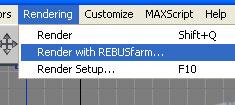 The Farminizer plug-inREBUSファームのホームページで、Farminizerを無料でダウンロードでき、Farminizerプラグインとレンダーファームマネジャーをまとめてインストールできる。すぐ無料でレンダー作業をお試しできる。費用の計算単位はGHz時間、これは1個1GHzのCPUを一時間レンタルするに相当する。もちろん、今のCPUはもっと強力です。Farminizerは自分のインターフェイスを3ds Max、Maya、Cinema4DとSoftimage XSIに統合させる。例えば、3ds Maxを使用する場合、レンダリングの項目を開くと、「REBUSファームでレンダーする」という項目で起動できる。REBUSメディアもこれを使い、社内の作業をレンダーファームに提出する。ユーザーは600倍も速い速度で作業を完成できる。具体的にいうと、普通は25日をかかるレンダリング作業でも、これを使えば、1時間以内で完成し、ユーザーのローカルフォルダに入る。
展望
新しいレンダーファームの概念は、3Dコミュニティに新しい力を持たされた。ユーザーがほしい機能が現実的なものになり、3Dスタジオの作業も今までより簡単になった。予想できる将来には、数軒大手なレンダー企業しか生き残らないが、レンダーファームに対する需要はまたまた増える。Farminizerでこの業界を引率しているREBUSファームは、すでにこれらの要求に応える用意を整えた。
A render farm inside the desktop
Monday, November 30th, 2009 by Ralph Huchtemann
Supercomputer G3 (1960) by Konrad Zuse
By realizing a new concept and utilizing a lot of development time the German company RebusFarm managed to integrate their 18,000 GHz renderfarm directly into several 3D-packages – through the use of plugins.
A commercial render farm serves different user profiles, which can be separated into three categories:
- It’s a saviour when a deadline can’t be met otherwise
- The user includes the renderfarm in his budget to take the edge off of peaks without the need to purchase new hardware
- Due to costs the rendering service is used constantly instead of the own hardware
The aforementioned settings dictate the demands a render farm has to meet in terms of delivery-speed and user-friendliness. The customer who is behind schedule won’t wait until the next day for his results, while the regular won’t put up with repetitive and cumbersome submission procedures to the render farm.
Previous concepts for render farm systems
To date the market differentiates between render farm systems with manual and semi-manual project-submission. The manual systems can’t fulfil the demand for a quick response, the worst case being that the response takes until the next day. Even in an ideal case a time-consuming process of establishing contact and adjusting the project is required. Semi-automated systems offer a web interface for the render job submission, which promise an immediate rendering start on the project. Unfortunately, most of the time the reality is a bit different: none of the systems are able to identify version numbers of the 3D-software and their rendering engine. This is very important, as one and the same project file tends to render differently on different software versions – bad surprises are inevitable. Furthermore missing plugins and textures aren’t recognized, while the costly rendering process is launched anyway.
The Farminizer concept
The RebusFarm software concept
None of the existing manual and semi-manual systems were able to convince the operators of RebusFarm. Based on the developers’ own demands end expertise, a fully automated service based on the fastsafe-carefree principle had to be possible. The aforementioned ideas led to a new and basically obvious approach: the user’s project had to be checked for completeness and compatibility inside his 3D-software via a plugin - the only place where all information about the project is still available. The Farminizer plugin submits the job to a rendering-manager, which administrates the job to the render farm. In the background the Farminizer plugin performs several adjustments to the project file, while also collecting information about the software versions and rendering engines, to match the render farm to the user. Basically the render farm and the project meet halfway. This ensures optimal conformity while disabling incorrect renderings on the render farm. The general rule: If the plugin submits the job, the project file will be rendered correctly on the render farm. Incorrect renderings are impossible: A novelty. Furthermore the project will be checked for popular user-errors before submission, sparing the user unnecessary costs. The Farminizer plugin generates a Zip-file and exports it to the render farm manager, which uploads the project, launches the rendering process and saves the rendered images in the user’s local output folder. The render farm manager is a combination of FTP-client and rendering-monitor. Added to that, it allows the import of project files from other 3D-applications which are able to export render farm compatible projects on their own. Thus the rendering service is topped off by supporting Maxwell.
Development
Since all known software packages had to be supported from the start, individual plugins had to be developed for 3ds Max, Maya, Cinema 4D and Softimage|XSI. It started in 2009 with the realization of the Farminizer plugin for 3ds Max, since it offers the biggest number of third-party plugins due to its early support for developers. It turned out that the Farminizer’s algorithms for 3ds Max can be translated to the other plugins like Cinema 4D, Maya, Lightwave, Softimage|XSI and Modo for the most part, but still, the individual software architectures and user workflows for the different applications asked for a lot of adjustments. The connected render farm manager kept growing with regards to comfort and speed. One of the highlights is the One-Click-technology, which allows a full automated handling of the project, until the rendered files can be found in the user’s local output folder.
The operative programming of the software was realized by at2. The experienced team tirelessly tackled one obstacle after the other to make the ambitious project possible at all. This resulted in a scalable system, which can be extended upon further 3D applications, rendering engines and software platforms. Amongst the Cinema 4D community the software developer is well-known for its plugins /SPLURF/, /enDOFin/ and /ReferenceShader/, and they were able to incorporate their Cinema 4D expertise into the project.
Advantages for the user
What came out was a robust, practice oriented application, which makes the user’s life with the render farm a lot easier, due to several features which make the renderfarm basically invisible. Now the user doesn’t have to worry about texture and output paths, proxies, GI-maps, XRef- and HDRIfiles, plugins, complicated FTP-client set-ups and hundreds of other little things. So far, only very simple projects could be rendered without the render farm operator or the user taking action. Now the Farminizer software allows a maximum of reliability and delivery speed, even with highly complex rendering projects. The RebusFarm Farminizer sets up a seamless link to the render farm and brings a capacity of 18,000 GHz to the user’s desktop. Except for the increased rendering speed it won’t feel different from a local rendering.
In practice
The Farminizer plugin
The Farminizer software can be downloaded for free on the RebusFarm website and installs the Farminizer plugin as well as the render farm manager. The rendering can be started right away with a free trial. Operating expenses are calculated in GHzh, which is the equivalent of renting one CPU-core with 1 GHz for 1 hour. Of course, a modern CPU consists of several cores with more GHz. The Farminizer plugin is integrated into 3ds Max, Maya, Cinema 4D and Softimage|XSI according to their individual workspaces. In 3ds Max, for example, you can run the plugin via the dropdown-menu “Rendering”-“Render with RebusFarm…” Usage of the Farminizer software turned out to be very useful, that the developer’s own production unit REBUSmedia utilizes it to submit their projects to the render farm. The user profits from a rendering speed over 600 times compared to a modern PC. To be more concrete: A rendering which would normally take 25 days to complete can be found in the user’s output folder after 1 hour.
Prospects
The new render farm concept gives new impetus to the 3D-community. A lot of the promises given by the render farm industry are fulfilled and simplify the work of 3D-studios of any size. It can be expected that the market for external render farms keeps growing, although the focus will be narrowed down to only a few suppliers. RebusFarm, as the technological market leader with their Farminizer software feel well equipped for things to come.
Art Wanted! Featuring Daniel D'Avila
Wednesday, November 22nd, 2017 by Julian Karsunky

“Irasshaimase!” and welcome, everybody. On today’s menu: ‘Fresh Hosomaki’, thin rolls of sushi, expertly prepared and served by acclaimed Brazilian 3D artist Daniel D’Avila. Exhibiting the same diligence and craftsmanship as a Japanese chef, his varied work is appreciated by gourmets of the digital arts and business clients alike. Following a long and illustrious career in advertising, Daniel now successfully manages his own studio, which works for global players such as Nestlé, Samsung, Nissan and MasterCard.
If the image above has whet your appetite, continue reading to find out more about Daniel D’Avila’s background and range of expertise.