
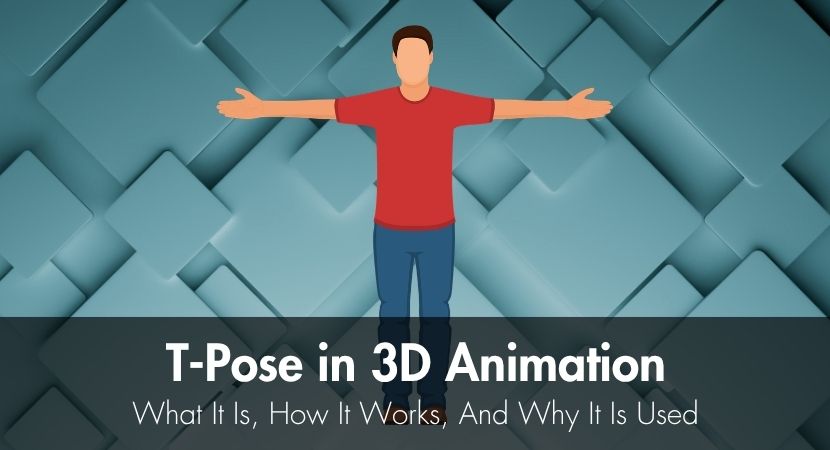
In 3D animation, a T-pose is the neutral default stance of a humanoid character model: the figure stands upright with both arms extended straight out to the sides, forming a capital letter "T". It has been the standard since the 1990s, because it makes character modeling, rigging and animation far more efficient.
In this guide, we'll discuss what the T-pose is, how it helps with modeling and animation, and why it's still being used today.
What is a T-Pose, and where did it come from?
There isn't a single source for the T-Pose, but it is more of a collective discovery in the modeling industry. It just made sense to set up a character in such a way that it is easier to do the following main modeling workflows:
- Skinning
- Rigging
- Joint placement
- Symmetry
- Detail sculpting
- Final posing
Today, the T-Pose is adopted as an industry standard in 3D pipelines across different modeling software.
Other teams call the T-Pose the "reference pose" or "retarget pose", depending on the pipeline it is being used in.
Why the T-Pose Still Matters in Production
The T-pose earns its place for three reasons. Extending the arms horizontally separates them from the torso, giving artists clear access to the shoulders and armpits during rigging and skinning. The 90-degree angle keeps the armpit and shoulder area balanced, which prevents unwanted mesh stretching when the character later raises its arms. And because the pose is a shared standard, motion capture and retargeting stay reliable when animation is transferred between different character skeletons.
Reliable symmetry for setup
In character modeling, modelers only model half of the character's body, then mirrored to the other side. This is why symmetry is very important. It avoids inconsistencies when mirroring. The T-Pose easily shows modelers if a character is perfectly balanced on both sides.
Cleaner rigging and early skinning
Having a character model in a neutral and symmetrical position, like the T-Pose, makes it easier to place joints and fix its structural foundation. This is basic rigging mechanics.
The reason is that when a character is in T-Pose, all joint centers are properly exposed. We're talking about shoulders, elbows, wrists, hips, and knees.
Skinning (skin weights), on the other hand, is assigning how much each joint influences the nearby surface, also known as deformation. T-Pose helps spot collapsing areas like shoulders or elbows early on. It is also a good baseline that reduces early distortion when applying skin weights.
Retargeting and mocap alignment
A mocap is usually a human actor who performs the motion that is then transferred to the 3D character model, a process called retargeting. Tools like Mixamo simplify this step by providing auto-rigged characters with pre-aligned skeletons.
Retargeting issues often come from differences in the initial rest pose, alignment, and joint orientation between rigs. A T-pose helps address these problems by providing a neutral, symmetrical reference that both the source and target rigs can align to before animation transfer, making the process more reliable across different skeletons.
Where You'll See the T-Pose in Real Workflows
The T-Pose will not just appear at the beginning of the modeling and animation phase. It appears throughout the whole production workflow.
Turnarounds, viewport checks, and measurements
The T-Pose can still be very useful, especially during inspection and technical checks. The T-Pose allows you to evaluate the output with clear views, and it easily exposes issues like uneven shoulders, misaligned limbs, incorrect scaling, and awkward proportions.
Imported rigs and reset behavior
It is common for 3D artists to import rigs between different software, and when they do, the rig often returns to a default state. In many cases, this default state is shown as a T-pose. The same behavior can also occur when a rig is reset.
The T-pose is useful in this context because it clearly indicates when a character has returned to its baseline state. This makes it easier to distinguish between a clean reset and potential issues with animation data, rig setup, or skeleton orientation.
Game and engine pipelines
In game development, where multiple characters, especially NPCs, are used, developers often share animation sets to save time and resources. A T-pose supports this workflow by providing a consistent reference for all characters, making it easier to reuse animations across different models. It also helps ensure skeletons align properly, which simplifies retargeting and improves compatibility across shared animation systems.
T-Pose vs A-Pose and other defaults
The T-pose is not the only default character position used in modeling and rigging. Another commonly used bind pose is the A-pose, where the arms are slightly lowered and rest away from the body in a more relaxed position.
The A-pose is often preferred when shoulder deformation is a key concern. It helps preserve shoulder volume and reduces issues like armpit collapse when the arms are raised during animation. You can find sample A-pose references to study how this neutral position is presented in real 3D models.
Most 3D software, such as Blender, Maya, and ZBrush, allows artists to define or adjust the default pose. The best choice depends on the character and workflow requirements. If standard T-poses or A-poses do not fit the needs of a project, teams can create a custom neutral pose, as long as it remains consistent and properly documented across the production pipeline.
What the T-Pose Is Not
A common misconception is that the T-pose is an acting pose. T-posing is not meant to make a model look appealing or to showcase its quality. Instead, it exists purely as a technical reference for production tasks such as rigging, skinning, symmetry checks, and animation transfer.
A character should not be judged based on its T-pose, since appeal, silhouette, and performance can only be properly evaluated when the model is in motion or placed in actual animation poses.
How to Set Up a Useful T-Pose (or Neutral Baseline)
Creating a TPose is not really about making a literal "T" out of your character reference. Arms don't have to be straightly leveled with the shoulders, nor do the torso and legs have to follow a straight line.
The real issues that modelers and animators concerning base poses is unclear and inconsistent baselines. It's not really about how the base pose looks, but how it is prepared and used.
Here are tips that can help you make a good baseline:
Small tweaks that improve deformation
Adding subtle bends and sensible shoulder positioning often helps improve deformation in some styles and rig goals.
When creating a base pose, imagine how the body naturally sits in resting position. Keep fingers naturally spaced, maintain a neutral facial expression, and use a stance where weight looks naturally distributed.
Common mistakes to avoid
- Asymmetry: both sides should be balanced.
- Overextended arms: this makes the rotation of the shoulder unnatural and often leads to collapsing and stiff movements in animations.
- Inconsistent hand rotation: both hands face the opposite direction, which makes it harder to mirror correctly. This may cause weird movements when animation is applied.
- Skipping deformation checks: this should prevent the above problems and should be performed regularly before moving to animating.
Setting Up Your First T-Pose
The TPose is a good place to start modeling because it provides a clear, balanced baseline for most workflows. While it is considered reliable and remains a widely used pose, poses like the A-pose can be more practical for certain applications.
The best default pose depends on your specific needs and pipeline. Always think about how the character will be animated and deformed later.
Some studios use automation tools to reduce the amount of manual setup involved and to help with predictable rigging and animation transfer. Automation is very helpful, especially for high-volume animation projects and rendering work. Services like RebusFarm can help offload these compute-heavy rendering processes so production stays efficient even under tight deadlines.
Watch the short video below to see how a T-Pose is set up in Blender:
Frequently Asked Questions.
What is a T-pose used for?
A T-pose is used as a neutral baseline for rigging, skinning, symmetry checks, and animation retargeting. It helps artists set up and transfer character movement more consistently across production workflows.
When should I choose A-pose instead of T-pose?
Choose the A-pose when shoulder deformation quality is a priority. The slightly lowered arms place less stress on the shoulder area, helping reduce armpit collapse and producing smoother arm movement during animation.
Can I retarget animation between characters with different default poses?
Yes, this is possible. The first step is to align both characters so that they share the same alignment (arm angle, joint orientation, and resting position). This way, the target character can interpret motion correctly, and a proper transfer can be completed without issues like twisted limbs and incorrect angles of rotation.
What is a quick test to validate a neutral pose before animation starts?
A good sanity check to perform right after skinning is to rotate your character’s joints through their expected motion ranges. Check the shoulders, elbows, hips, and knees. See if there are any collapsing meshes or uneven deformations exposed around the joints when tested.
How strict does a T-pose need to be for production work?
A T-Pose doesn't really need to be perfectly, mathematically perfect across models. What makes T-posing work is symmetry and visibility of all character parts. It is actually advisable to make slight changes to the standard T-Pose if it makes your modeling workflow easier. Some tweak the pose to have slightly bent elbows and knees, more relaxed shoulders, spaced fingers, and other adjustments.
Should every character use the exact same default pose?
No, not every character should use the same default pose. However, it's important to maintain consistency across your projects. Studios use standard references to make everything more predictable and easily replicated. Using different default poses for every character, if not really necessary, can make rigging, skinning, and animation transfer complicated.
About the author
Nicole Holt is an experienced 3D enthusiast with a career in marketing and content writing. Thanks to this unique combination, she is able to showcase the technical intricacies of 3D art and rendering while also making the subject accessible to a wide audience. When she's not immersed in the digital world, Nicole can be found in the great outdoors, most likely with her beloved dog, Sammy.