
렌더 팜 블로그
렌더팜 블로그에 오신 것을 환영합니다! 업계 인사이트, 심층적인 제작 스토리, 전문가 팁, 특별 혜택 및 유니티의 독점적인 RebusArt 기능 등 3D의 세계로 빠져보세요. 유니티와 함께 영감을 얻고 렌더링의 한계를 뛰어넘으세요!
Cinebench: Measure your CPU performance for 3D Rendering
Thursday, 14 June 2012 by Nicole Holt
In the ever-evolving landscape of digital content creation, the performance of your CPU plays a crucial role. In a world dominated by visual effects and 3D animations, it's essential to consider the tools and benchmarks that can help you assess and optimize your computer's processing power.
Rendered at RebusFarm: RUIN Short Film
Monday, March 19th, 2012 by Ralph Huchtemann
RUIN has been 100% rendered at RebusFarm in 2012 by Los Angeles-based Oddball Animation studio, with most of the modeling and animation done by Wes Ball.
Rendering and Modelling: modo
Animation: Lightwave
http://www.conceptruin.com
FUNK BLASTER is a music video of KOAN Sound, a British dubstep group, directed by Los Angeles-based artist and filmmaker Scott Pagano.
Software: Maya and V-Ray
REBUS Renderfarm Blog
2009년 11월 30일 월요일 Ralph Huchtemann 작성
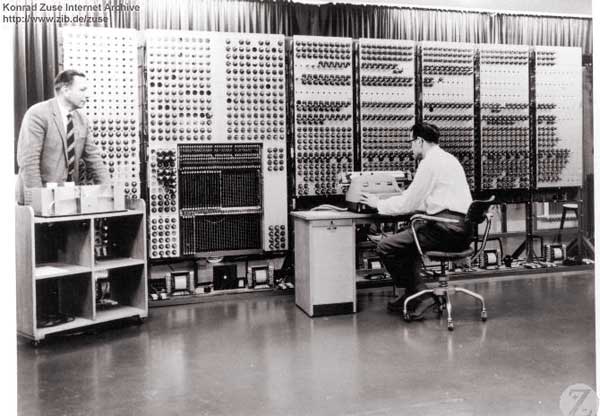 Supercomputer G3 (1960) by Konrad Zuse
새로운 개념을 실현하고 개발 시간을 많이 들인 플러그인의 사용을 통해 독일 회사 REBUSfarm은 여러 3D 패키지와 자사의 18,000 GHz의 렌더팜을 통합했습니다..
상용 렌더팜은 세가지 범주로 다른 사용자 프로파일을 제공합니다:
- 도저히 마감을 맞추기 힘들때 그것은 구세주입니다.
- 사용자는 새로운 하드웨어를 구입할 필요없이 예산에 렌더팜을 포함하여 금액이 너무 높아지지 않게 합니다.
- 비용 때문에 렌더링 서비스가 자신의 하드웨어 대신 지속적으로 사용됩니다.
위의 범주에서 보면 전송 속도와 사용자 편의의 측면에서 렌더팜에 요구되는 사항을 알 수 있습니다. 결과를 다음날까지 기다릴 수 없는 스케줄을 가진 고객은 반복적이고 성가신 렌더팜 제출(submissision) 절차를 받아 들이기 힘듭니다.
이전의 렌더팜 시스템 개념
시장은 프로젝트를 제출(submission)하는 것에서 수동과 반 수동 렌더팜 시스템을 구별하게 됩니다. 수동 시스템은 빠른 응답에 대한 수요를 충족시 수 없으며, 최악의 경우 응답이 다음날까지 걸리는 경우도 있습니다. 비록 이상적인 경우라 할지라도 프로젝트와 렌더팜 간에 조정하고 접속하는 과정에 시간이 소요됩니다. 반-수동 시스템은 렌더잡 제출(submission)하기 위한 웹 인터터페이스를 제공하며, 프로젝트를 즉각적으로 렌더링할 수 있도록 약속합니다. 아쉽게도 현실은 조금 다릅니다: 어떤 시스템도 3D 소프트웨어의 버전과 렌더 엔진을 인식하지 못합니다. 이것은 매우 중요합니다, 하나 그리고 같은 프로젝트 파일은 다른 버전의 소프트웨어에서 다르게 렌더링되는 경향이 있습니다. – 나쁜 결과는 예상할 수 있는 것입니다. 게다가 플러그인과 텍스춰(texture)의 누락(missing)을 인식하지 못한체 렌더링이 시작됩니다.
Farminizer의 개념
 The REBUSfarm software concept기존의 어떠한 수동 및 반-수동 시스템도 REBUSfarm을 만족시키지 못했습니다.개발자 자신의 최종 전문지식을 바탕으로, 완전 자동화에 기초한 빠르며 안전하고 편안한 서비스를 실현 시켰습니다. 상기 아이디어는 새롭고 기본적으로 분명한 접근을 이끌어 주었습니다: 사용자의 프로젝트는 완성도와 호환성이 3D 소프트웨어내의 플러그인(프로젝트가 유효한가에 관한 모든 정보가 있는 곳)을 통해 점검 되어야만 합니다. The Farminizer 플러그인은 렌더팜 상에서 잡(job)을 컨트롤 할 수 있는 렌더링 매니저에 잡(job)을 제출(submit)합니다. 백그라운드 상에서 Farminizer 플러그인은 프로젝트 파일에 대해 여러번의 조정을 수행하며 또한 소프트웨어 버전과 렌더 엔진에 관한 정보를 수집하여 렌더팜을 사용자와 일치시킵니다. 기본적으로 렌더팜과 프로젝트간에 브릿지 역할을 하며 렌더팜 상에서 잘못된 렌더링을 방지해 최적의 적합성을 보장합니다. 일반적인 규칙: 만약 플러그인을 사용해 잡(job)을 제출(submit)한다면, 프로젝트는 렌더팜 상에서 올바르게 렌더링 됩니다. 잘못된 렌더링은 불가능합니다. 게다가 Farminizer 플러그인은 제출(submission)전에 사용자의 자주 있는 에러를 검사해 불필요한 지출을 방지해 줍니다. Farminizer 플러그인은 ZIP파일을 생성하며 렌더팜 매니저(업로드된 프로잭트에 대해 렌더를 실행시키고 렌더된 이미지를 사용자의 로컬 아웃풋 폴더에 저장을 함)로 익스포트(export)합니다. 렌더팜 매니저는 FTP-client와 렌더링 모니터의 역할을 합니다. 덧붙여 렌더팜-호환성 있는 프로젝트를 직접 익스포트(export)할 수 있는 다른 3D 어플리케이션으로 부터 프로젝트 파일을 임포트(import)할 수 있게 해줍니다. 따라서 렌더링 서비스는 맥스웰을 지원하면서 마무리 됩니다.
개발
잘 알려진 모든 소프트웨어-패키지들은 처음부터 지원되어야 했기 때문에 3ds Max, Maya, Cinema4D and Softimage|XSI를 위한 개별적인 플러그인을 개발해야만 했습니다. 2009년 3ds Max용 Farminizer 플러그인(이건 개발자를 위한 초기지원에 때문에 third-party 플러그인들이 가장 많습니다.)의 실현과 함께 시작되었습니다. 3ds Max용 Farminizer 플러그인은 다른 Cinema4D, Maya, Lightwave, Softimage|XSI와 modo용 플러그인으로 이식된다는 것이 드러났지만 여전히 개별적인 아키텍처를 가진 소프트웨어들과 다른 어플리케이션들의 유저워크플로우는 많은 조정이 필요합니다. 연결된 렌더팜 매니져는 편안함과 속도가 계속 증가해 갔습니다. 그것의 하이라이트 중 하나는 원-클릭-기술(렌더된 파일이 사용자의 로컬 아웃풋 폴더에서 발견될 수 있게 프로젝트를 완전 자동으로 핸들링할 수 있게 해주는)입니다.
소프트웨어의 효과적인 프로그래밍은 at2에 의해 실현되었습니다. 경험이 풍부한 팀이 야심찬 프로잭트를 가능하게 만들기 위해 쉬지않고 문제 해결에 매달렸습니다. 그 결과 확장 가능한 시스템은 3D 응용프로그램, 렌더링엔진 및 소프트웨어 플랫폼으로 더욱 확장될 수 있읍니다. Cinema4Dcommunity 사이의 소프트웨어 개발자는 플러그인 /SPLURF/, /enDOFin/ 와 /ReferenceShader/로 잘 알려져 있으며 그들은 프로젝트에 자신의 Cinema4D 전문지식을 포함시킬 수 있었습니다.
사용자의 이점
그리하여 나온것은 강력한 것이였습니다, 사용자의 삶을 렌더팜과 함께 훨씬 쉽게 만들어 주는 실천 지향의 어플리케이션, 여러가지 기능이 기본적으로 보이지 않는 렌더팜으로 만듭니다. 이제 사용자는 텍스춰와 저장경로, 프록시, GI-map, XRef와 HDRIfile, 플러그인, 복잡한 FTP-client 셋업과 수백가지의 다른 사소한 일들에 대한 걱정을 하지 않아도 됩니다. 지금까지는 렌더팜 오퍼레이터나 사용자의 조작없이는 아주 간단한 프로젝트만 렌더링될 수 있었습니다. 이제 Farminizer 소프트웨어가 고도로 복잡한 프로젝트까지 안정성과 전송속도의 최대치를 가능케 합니다. REBUSfarm-Farminizer는 렌더팜에 대한 원활한 연결을 설정하고 사용자의 데스크탐에 18,000 GHz의 능력을 제공합니다. 향상된 렌더링 속도를 제외하고는 로컬 렌더링과 큰 차이를 느낄 수 없습니다.
연습
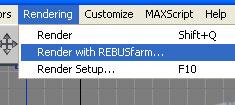 The Farminizer plug-inFarminizer 소프트웨어는 RebusFarm 홈페이지에서 무료로 다운 받을 수 있으며 Farminizer 와 Renderfarm Manager를 설치합니다. 렌더링은 무료 평가판으로 시작할 수 있습니다. 비용은 1시간동안 1 GHz의 CPU 코어 하나와 동일한 GHz로 계산됩니다. 물론 최신의 CPU는 좀 더 높은 GHz와 여러개의 코어로 구성됩니다. Farminizer 플러그인은 3ds Max, Maya, Cinema4D and Softimage|XSI의 개별적 워크스페이스와 연계됩니다. 예를 들어 3ds Max에서는 “Rendering" -“Render with REBUSfarm…”의 드롭다운 메뉴에서 플러그인을 실행 시킬수 있습니다. 개발자 자신이 REBUSmedia에서 자신의 프로젝트를 렌더팜에 제출(submit)한 경험을 바탕으로 만든 Farminizer 소프트웨어는 매우 유용한 것으로 드러났습니다. 속도면에서 사용자가 받는 이득은 최신 PC와 비교해 600배 이상입니다. 또는 좀 더 구체적으로: 보통 25일 정도 소요되는 렌더링을 1시간 후에 사용자의 아웃풋 폴더에서 볼 수 있습니다.
전망
새로운 렌더팜의 개념은 3D 커뮤니티에 새로운 자극제를 제공합니다. 성취된 렌더팜 산업은 많은 약속들을 해주며 모든 규모의 3D 스튜디오 작업을 단순화 합니다. 비록 포커스가 몇몇 공급자들로 줄어들 것이지만 외부 렌더팜 시장은 계속 성장할 것이라고 예상됩니다. REBUSfarm은 기술 시장의 리더로써 자사의 Farminizer 소프트웨어와 함께 잘 갖추어 상황이 올것이라고 느낍니다.
A render farm inside the desktop
Monday, November 30th, 2009 by Ralph Huchtemann
Supercomputer G3 (1960) by Konrad Zuse
By realizing a new concept and utilizing a lot of development time the German company RebusFarm managed to integrate their 18,000 GHz renderfarm directly into several 3D-packages – through the use of plugins.
A commercial render farm serves different user profiles, which can be separated into three categories:
- It’s a saviour when a deadline can’t be met otherwise
- The user includes the renderfarm in his budget to take the edge off of peaks without the need to purchase new hardware
- Due to costs the rendering service is used constantly instead of the own hardware
The aforementioned settings dictate the demands a render farm has to meet in terms of delivery-speed and user-friendliness. The customer who is behind schedule won’t wait until the next day for his results, while the regular won’t put up with repetitive and cumbersome submission procedures to the render farm.
Previous concepts for render farm systems
To date the market differentiates between render farm systems with manual and semi-manual project-submission. The manual systems can’t fulfil the demand for a quick response, the worst case being that the response takes until the next day. Even in an ideal case a time-consuming process of establishing contact and adjusting the project is required. Semi-automated systems offer a web interface for the render job submission, which promise an immediate rendering start on the project. Unfortunately, most of the time the reality is a bit different: none of the systems are able to identify version numbers of the 3D-software and their rendering engine. This is very important, as one and the same project file tends to render differently on different software versions – bad surprises are inevitable. Furthermore missing plugins and textures aren’t recognized, while the costly rendering process is launched anyway.
The Farminizer concept
The RebusFarm software concept
None of the existing manual and semi-manual systems were able to convince the operators of RebusFarm. Based on the developers’ own demands end expertise, a fully automated service based on the fastsafe-carefree principle had to be possible. The aforementioned ideas led to a new and basically obvious approach: the user’s project had to be checked for completeness and compatibility inside his 3D-software via a plugin - the only place where all information about the project is still available. The Farminizer plugin submits the job to a rendering-manager, which administrates the job to the render farm. In the background the Farminizer plugin performs several adjustments to the project file, while also collecting information about the software versions and rendering engines, to match the render farm to the user. Basically the render farm and the project meet halfway. This ensures optimal conformity while disabling incorrect renderings on the render farm. The general rule: If the plugin submits the job, the project file will be rendered correctly on the render farm. Incorrect renderings are impossible: A novelty. Furthermore the project will be checked for popular user-errors before submission, sparing the user unnecessary costs. The Farminizer plugin generates a Zip-file and exports it to the render farm manager, which uploads the project, launches the rendering process and saves the rendered images in the user’s local output folder. The render farm manager is a combination of FTP-client and rendering-monitor. Added to that, it allows the import of project files from other 3D-applications which are able to export render farm compatible projects on their own. Thus the rendering service is topped off by supporting Maxwell.
Development
Since all known software packages had to be supported from the start, individual plugins had to be developed for 3ds Max, Maya, Cinema 4D and Softimage|XSI. It started in 2009 with the realization of the Farminizer plugin for 3ds Max, since it offers the biggest number of third-party plugins due to its early support for developers. It turned out that the Farminizer’s algorithms for 3ds Max can be translated to the other plugins like Cinema 4D, Maya, Lightwave, Softimage|XSI and Modo for the most part, but still, the individual software architectures and user workflows for the different applications asked for a lot of adjustments. The connected render farm manager kept growing with regards to comfort and speed. One of the highlights is the One-Click-technology, which allows a full automated handling of the project, until the rendered files can be found in the user’s local output folder.
The operative programming of the software was realized by at2. The experienced team tirelessly tackled one obstacle after the other to make the ambitious project possible at all. This resulted in a scalable system, which can be extended upon further 3D applications, rendering engines and software platforms. Amongst the Cinema 4D community the software developer is well-known for its plugins /SPLURF/, /enDOFin/ and /ReferenceShader/, and they were able to incorporate their Cinema 4D expertise into the project.
Advantages for the user
What came out was a robust, practice oriented application, which makes the user’s life with the render farm a lot easier, due to several features which make the renderfarm basically invisible. Now the user doesn’t have to worry about texture and output paths, proxies, GI-maps, XRef- and HDRIfiles, plugins, complicated FTP-client set-ups and hundreds of other little things. So far, only very simple projects could be rendered without the render farm operator or the user taking action. Now the Farminizer software allows a maximum of reliability and delivery speed, even with highly complex rendering projects. The RebusFarm Farminizer sets up a seamless link to the render farm and brings a capacity of 18,000 GHz to the user’s desktop. Except for the increased rendering speed it won’t feel different from a local rendering.
In practice
The Farminizer plugin
The Farminizer software can be downloaded for free on the RebusFarm website and installs the Farminizer plugin as well as the render farm manager. The rendering can be started right away with a free trial. Operating expenses are calculated in GHzh, which is the equivalent of renting one CPU-core with 1 GHz for 1 hour. Of course, a modern CPU consists of several cores with more GHz. The Farminizer plugin is integrated into 3ds Max, Maya, Cinema 4D and Softimage|XSI according to their individual workspaces. In 3ds Max, for example, you can run the plugin via the dropdown-menu “Rendering”-“Render with RebusFarm…” Usage of the Farminizer software turned out to be very useful, that the developer’s own production unit REBUSmedia utilizes it to submit their projects to the render farm. The user profits from a rendering speed over 600 times compared to a modern PC. To be more concrete: A rendering which would normally take 25 days to complete can be found in the user’s output folder after 1 hour.
Prospects
The new render farm concept gives new impetus to the 3D-community. A lot of the promises given by the render farm industry are fulfilled and simplify the work of 3D-studios of any size. It can be expected that the market for external render farms keeps growing, although the focus will be narrowed down to only a few suppliers. RebusFarm, as the technological market leader with their Farminizer software feel well equipped for things to come.
Art Wanted! Featuring Daniel D'Avila
Wednesday, November 22nd, 2017 by Julian Karsunky

“Irasshaimase!” and welcome, everybody. On today’s menu: ‘Fresh Hosomaki’, thin rolls of sushi, expertly prepared and served by acclaimed Brazilian 3D artist Daniel D’Avila. Exhibiting the same diligence and craftsmanship as a Japanese chef, his varied work is appreciated by gourmets of the digital arts and business clients alike. Following a long and illustrious career in advertising, Daniel now successfully manages his own studio, which works for global players such as Nestlé, Samsung, Nissan and MasterCard.
If the image above has whet your appetite, continue reading to find out more about Daniel D’Avila’s background and range of expertise.